
 Analytics Tools
  Commerce
  Content Management
  Customer Service
  Data Privacy
  Design
  Development
  ERP
ERP  Hosting
  HR
HR  Sales Tools
  Security
 Keyword Golden Ratio: How to find keywords you can rank for in 48 hours
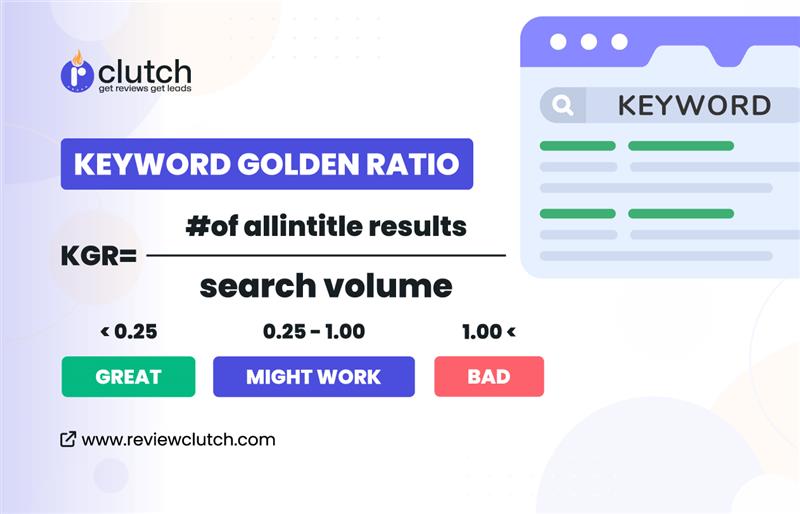
The Keyword Golden Ratio (KGR) is a smart method that enables rapid ranking on Google. It aims to find low-competition keywords. These keywords can boost your content into the top 50 search results. This method works well even if your website has low domain authority or few backlinks.
Choosing the right keywords can boost your website traffic. You can do this without spending much time or money. The KGR method is simple and effective. It helps you find effective keywords.
This makes it easier to grow your audience and boost your rankings. Focus on quality keywords and watch your content perform better in search engines.
Here’s what you will find in this (KGR) guide:
- Learn about the Keyword Golden Ratio (KGR) and how it works.
- A success story showing the real results of using KGR.
- How ultra-long-tail keywords can help rank faster and avoid delays in search engines.
- Tips on using keyword tools to speed up research.
- Examples of KGR keywords applied in real situations.
- Mistakes to avoid and answers to common questions.
This guide focuses on practical advice for anyone who wants to use KGR effectively. It keeps things simple, clear, and actionable.
What is Keyword Golden Ratio (KGR)?
The Keyword Golden Ratio (KGR) is a simple way to find low-competition keywords. It finds keywords that are unique but still have solid search potential. By focusing on these keywords, your content can rank faster on search engines.
Many people use the KGR method. It helps them find high-search, low-competition keywords for their websites. You can also use it on platforms like LinkedIn and YouTube.
When you target a KGR keyword and post optimized content, it can rank in the top 50 search results in a short time. Websites with some authority even have a chance to rank in the top 15.
Why Use the KGR Method?
This method finds the best keywords for your content. It gives you a competitive boundary.
Here are the 3 main reasons why The KGR is helpful-
1. Quick Results for New Websites
New websites often struggle to rank. The KGR method helps drive traffic early by focusing on easy-to-rank keywords. It speeds up growth and helps attract visitors sooner.
2. Better Keyword Focus
The KGR method helps avoid wasting time on hard-to-rank topics. It filters high-value keywords that can bring traffic and improve rankings. This method works great with tools like Google Analytics and YouTube keyword search.
3. Manual Research for Better Insight
Unlike automated tools, the KGR method involves manual research. This uncovers valuable keywords that others often miss. It’s great for finding keywords with low competition. This helps boost search visibility.
The KGR strategy helps content creators focus on low competition keywords. This boosts rankings and brings in valuable traffic. It’s a great way to build a strong content strategy with real, measurable results.
KGR Success Story
Let’s first see how the Keyword Golden Ratio (KGR) can boost traffic and revenue.
A practical test with Amazon Affiliate sites showed clear results. By targeting KGR keywords, 200 posts were published over five months. This strategy led to more traffic and better earnings.
The Keyword Golden Ratio works by focusing on low-competition keywords. These keywords are easier to rank for, making it simple to attract visitors. Using this method, websites can grow their traffic steadily while also increasing revenue.
The results were outstanding:
- Earnings jumped from $100 to $14,853 in 12 months.
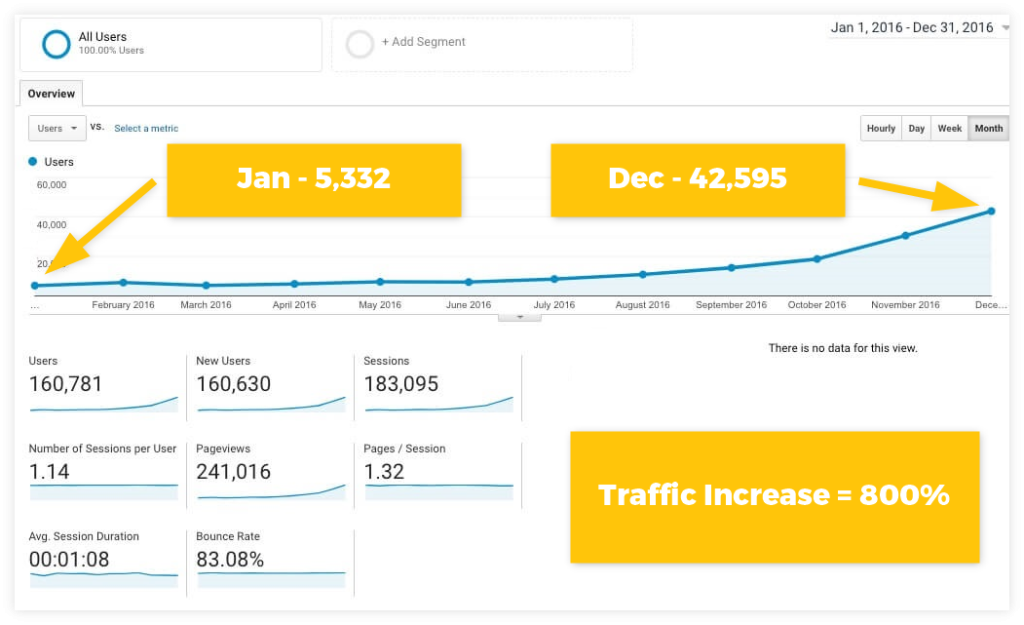
- Traffic increased by 800%, bringing a flood of new visitors.
Here’s a simple breakdown of the process:
- Small start: Began with 20 posts to test if the Keyword Golden Ratio (KGR) method worked. The results were positive, so content production was scaled up.
- Scaling content: Started slowly with 7 posts in the first month. By the fifth month, the team published over 60 posts monthly to ramp up growth.
- Consistent traffic growth: Traffic grew steadily. Once 200 posts were live, a significant spike in visitors followed.
- No backlinks needed: We did not use any link-building campaigns. The site benefited from existing guest post links.
- Revenue matched growth: Earnings rose with traffic, reaching $15,000 in the peak month.
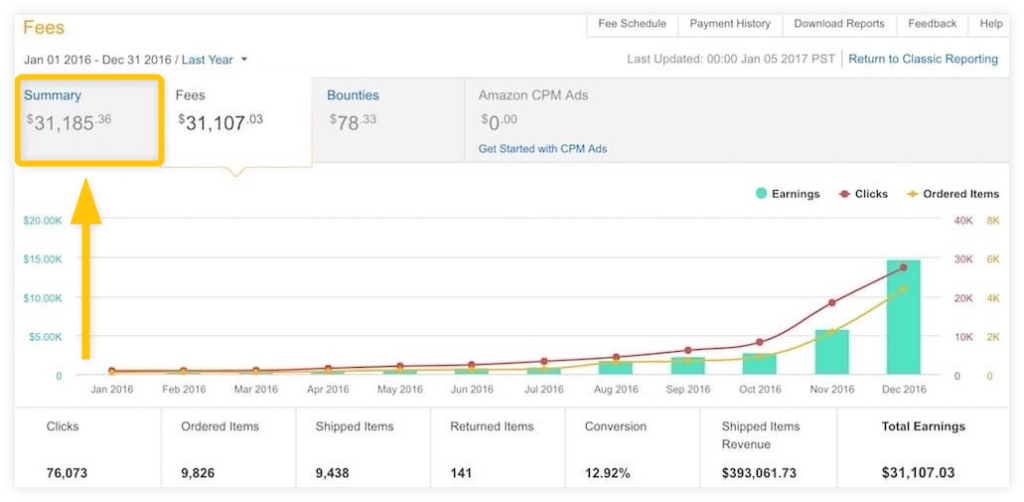
This case study shows the power of the Keyword Golden Ratio. Consistent publishing and strategic scaling can deliver big results.
How to Calculate the Keyword Golden Ratio
The Keyword Golden Ratio (KGR) is a simple method to find low-competition keywords. These keywords are easier to rank for, even on a new website.
Here’s the formula:
KGR = Number of Google “allintitle” results / Monthly search volume (limited to under 250).
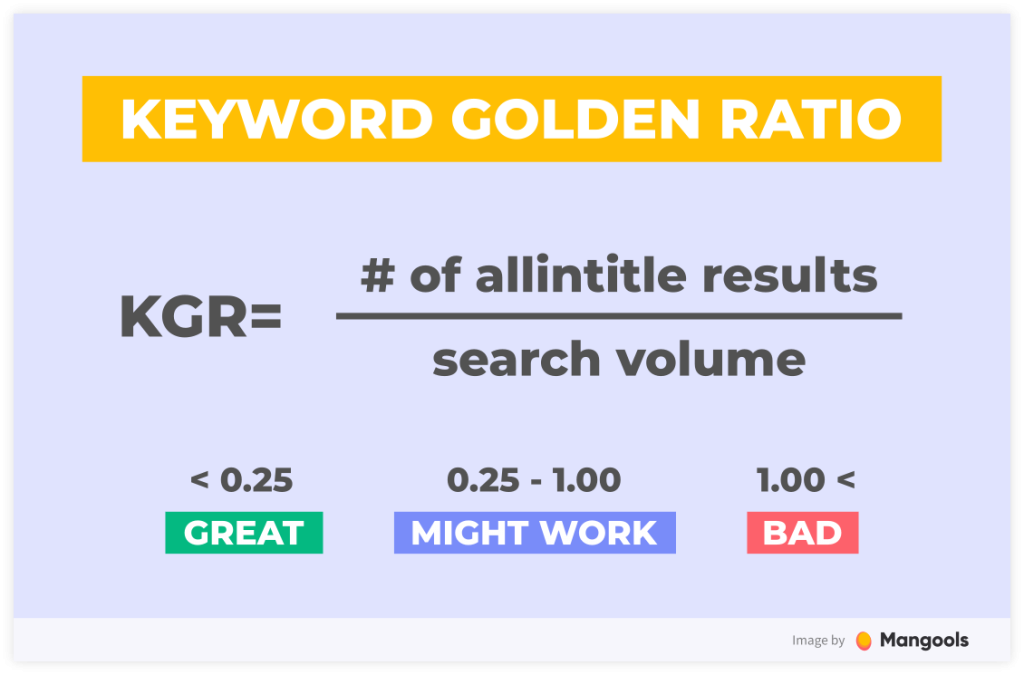
If the KGR is below 0.25, your page has a good chance of ranking in the top 50 shortly after being indexed. For KGR values between 0.25 and 1, ranking in the top 250 is possible, but it may take more time. This strategy helps you find less competitive keywords. These keywords have a better chance of ranking higher.
Details about the formula:
- Low search volume terms rank faster.
Keywords with fewer searches, like 250 or lower, face less competition. This makes them quicker to rank compared to keywords with higher search volumes, like 2,500.
- High search volume keywords are crowded.
Most websites target keywords with higher search volumes for more traffic. This increases competition, making it harder to rank for those terms.
Keeping the KGR below 0.25 ensures you’re targeting keywords with fewer competitors. For example, if the monthly search volume is 250 and the KGR is 0.25, there will be about 63 “allintitle” results. That means only 63 pages are directly competing for the same keyword.
What is “allintitle”?
“allintitle” is a Google search operator. It finds web pages with the exact keyword phrase in their title. This helps determine how many pages directly compete for that keyword.
To use it, type the following in Google:
allintitle:”your keyword phrase”

This will show you how many pages have the keyword in their title. Fewer results mean less competition.
Google limits on allintitle searches
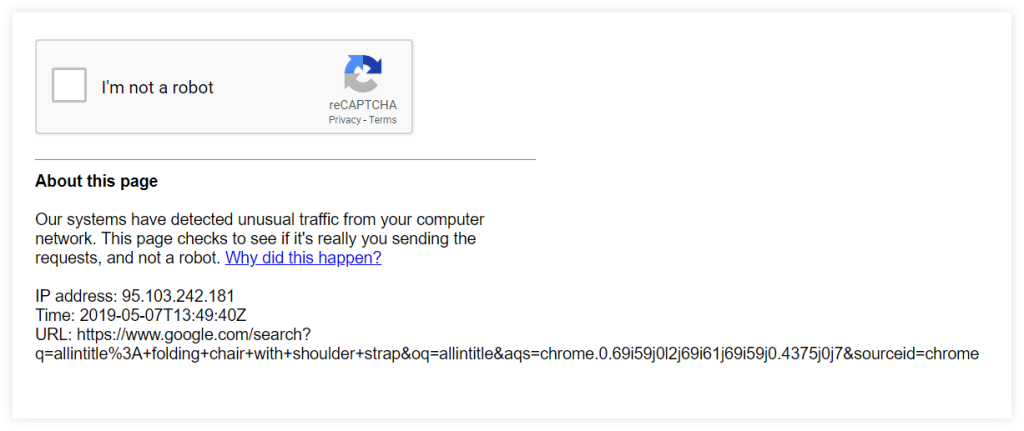
Using “allintitle” often may cause Google to show a CAPTCHA. This happens when Google detects frequent or automated searches. Complete the CAPTCHA, and then continue searching.
Tips for Using KGR
- Target KGR values under 0.25.
- Focus on keywords with fewer than 250 monthly searches.
- Use long-tail keywords, which are more specific and less competitive.
- Use tools like Google Keyword Planner or Ahrefs to find search data.
Why KGR is effective
The KGR strategy works by steering clear of keywords that have high competition. Instead, it focuses on keywords with low competition and steady traffic. By targeting these terms, you can improve rankings and drive organic traffic even if your site is new.
This strategy works well for blogs, niche sites, and those aiming for easier keywords. Stick to keywords with lower competition and watch your rankings improve.
Ultra long-tail keywords and Google Sandbox
New websites often struggle to rank on Google. Targeting long-tail and ultra-long-tail keywords can help. These keywords have less competition and offer a way for new sites to gain visibility faster.
What is the Google Sandbox?
The Google Sandbox is a term used to explain why new sites take longer to rank. People think that Google delays rankings for new websites. This allows them to check quality and relevance. Many site owners see that new domains often rank slower. But there is no official proof of this.
How do long-tail keywords help?
Ultra long-tail keywords are specific and less competitive. They might have fewer searches but deliver more targeted traffic. Newer sites should target niche terms. Big websites often chase high-volume keywords. This makes niche keywords a smarter choice for them. They offer a chance to shine and draw visitors. This happens without facing competition from bigger, established websites.
Why High-Volume Keywords are Hard to Rank?
High-volume keywords face tough competition. Large websites make significant investments in content and backlinks to maintain their rankings. Competing with them requires time and effort. Long-tail keywords can attract early traffic. This helps a site grow and build domain authority over time.
Does the KGR really cut the sandbox?
The Keyword Golden Ratio (KGR) is a useful strategy for new websites. By targeting ultra long-tail keywords, sites can rank faster and attract visitors. While it may not completely bypass the sandbox effect, it helps build momentum.
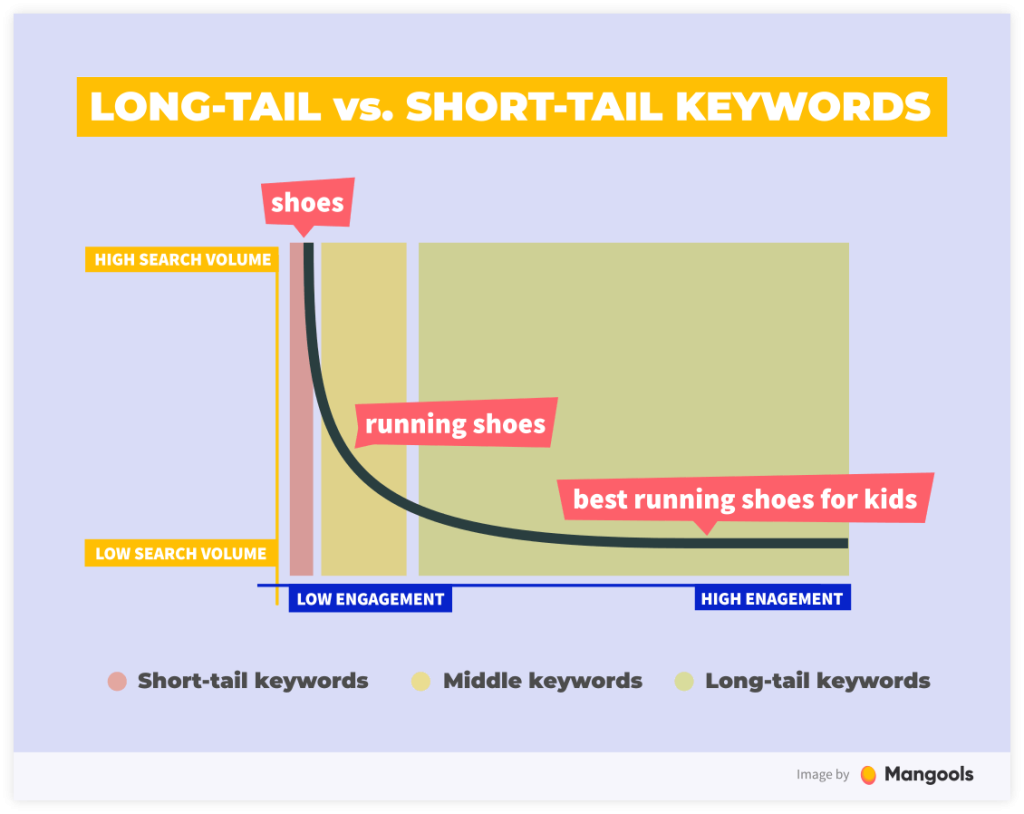
It’s a smart move to focus on specific, low-competition keywords. This approach brings organic traffic and lays a foundation for long-term growth.
How to use a keyword tool to find KGR terms
Here are some real examples of keywords that follow the Keyword Golden Ratio (KGR) method. Let’s take an example from a popular niche – the shaver niche.
This niche has public case studies, high competition, and many copycat sites. But there are still many KGR-friendly keywords out there.
It shows that in competitive markets, chances still exist to rank for low-competition terms.
1. Find relevant keyword ideas
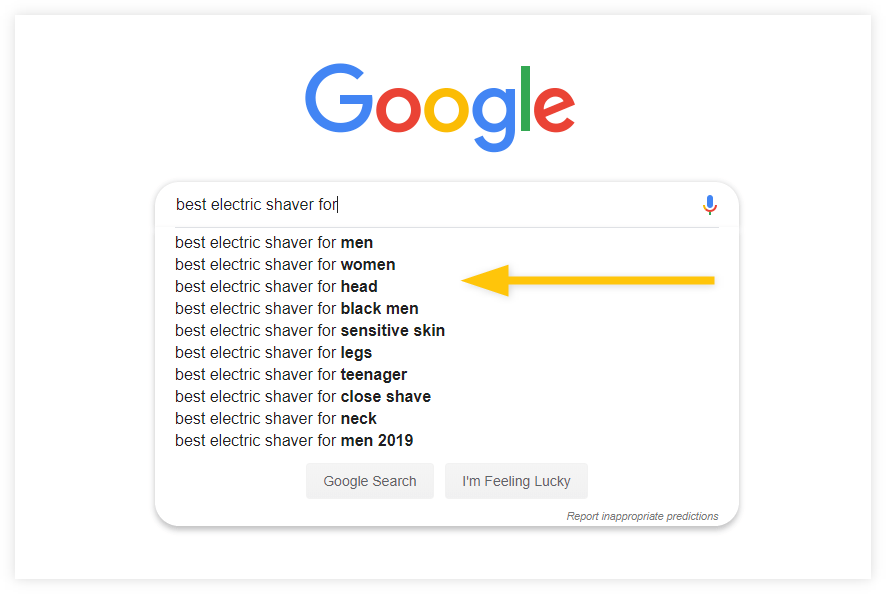
To discover KGR (Keyword Golden Ratio) compliant keywords, start with Google Autosuggest.
Use this simple format: best (product-type) for (application or user-type).
You can manually search using this method, but using a keyword tool like KWFinder can save time. KWFinder offers advanced filtering and shows the Keyword Difficulty (KD) metric.
You can do this manually and it looks like this:
Here’s how to do it:
Choose the autocomplete option in the tool.
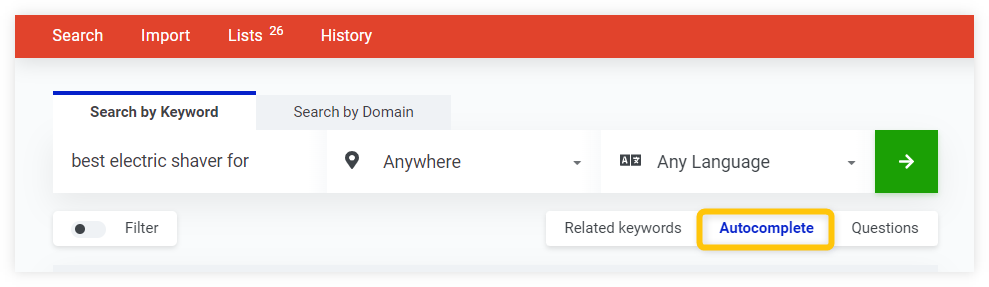
Enter your search phrase and click “Find Keywords.”
You’ll see a list of results. Focus on Search Volume and Keyword Difficulty. Other metrics can be ignored at this stage.
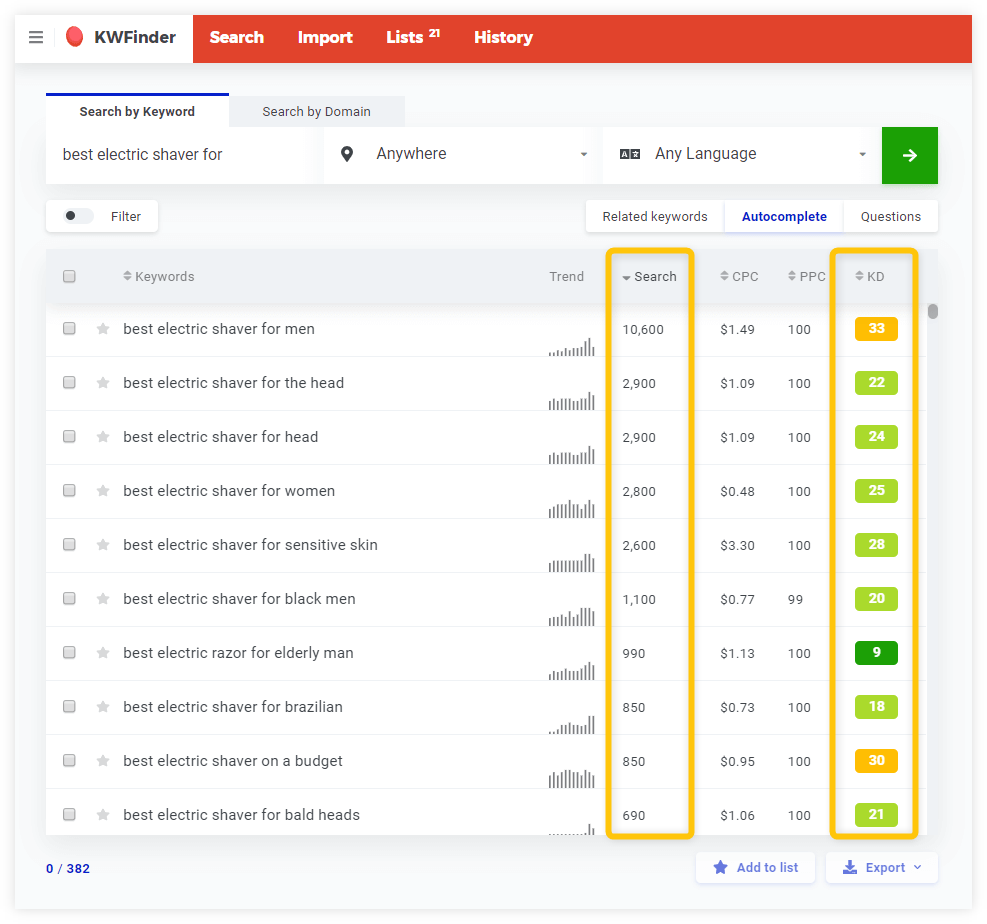
For this search, you can leave the geography as “Anywhere” or set your target location.
Switch to the “Questions” tab if you want more specific long-tail keywords. These often provide better opportunities for ranking, as they answer direct user queries.
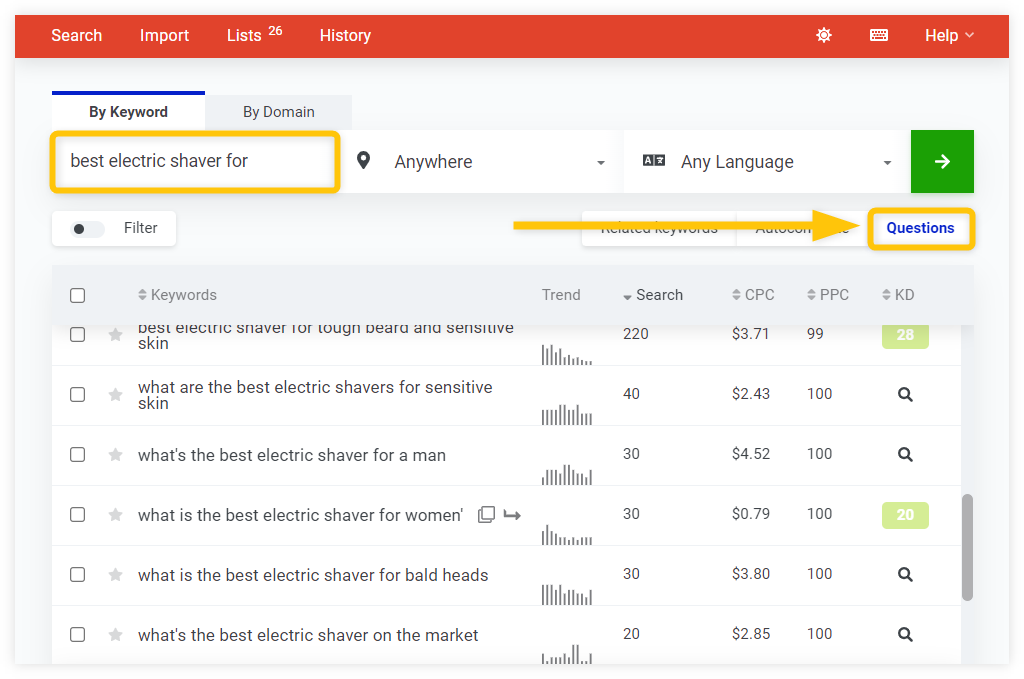
2. Filter keywords with search volume under 250
To use the KGR method, focus on keywords with a search volume below 250. Here’s how you can filter them step by step:
Set the maximum search volume to 250 in the filter options.
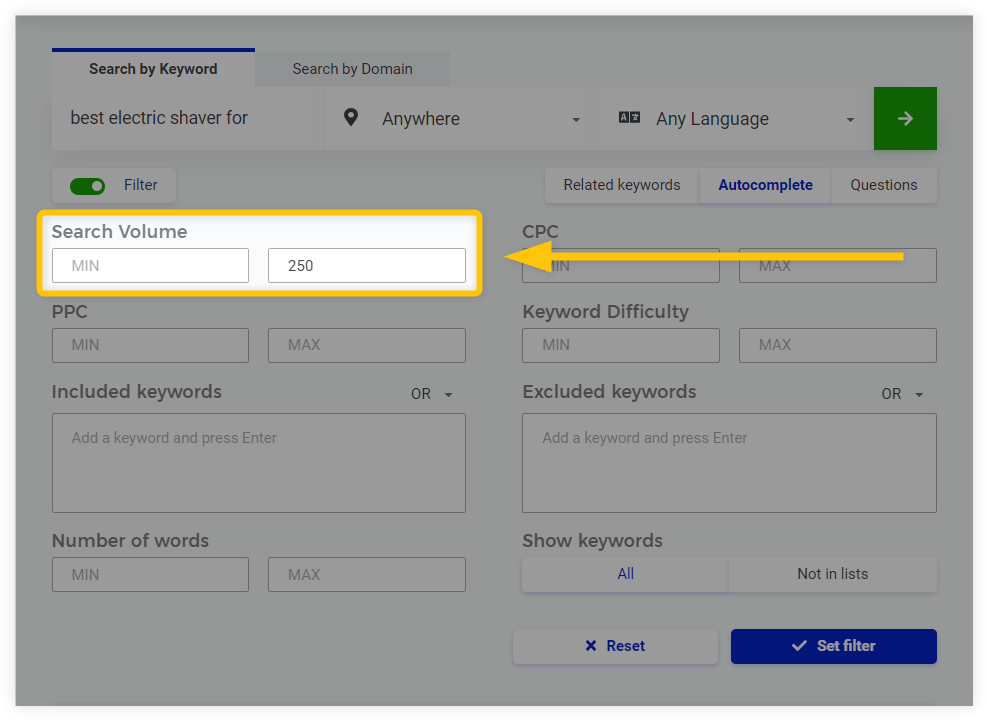
Click the “Set filter” button to remove keywords with higher search volumes.
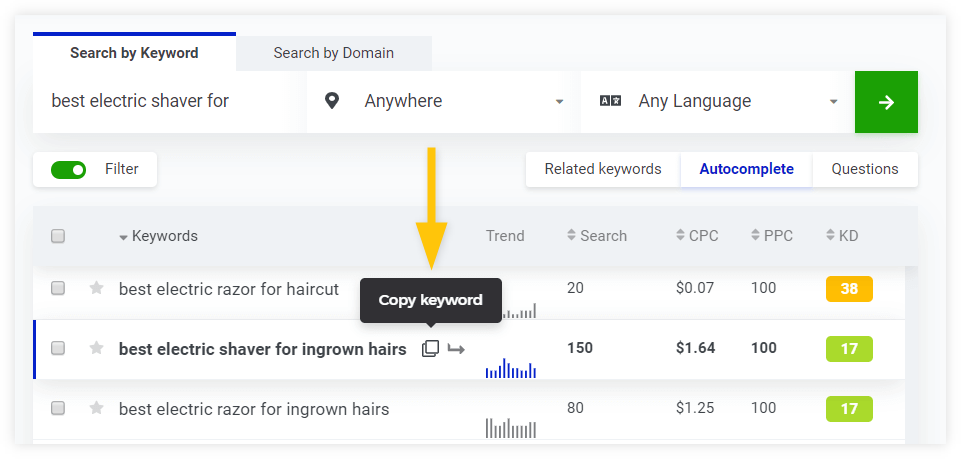
After applying the filter, you’ll see plenty of relevant keywords with search volumes under 250. For even better results, you can add more filters like a KD (Keyword Difficulty) limit of 15, 20, or 25.
For example, the keyword “best electric shaver for ingrown hairs” shows a KD of 17 and a search volume of 150. This fits perfectly within the KGR requirements.
You can hover over the keyword to copy the phrase quickly and save time during your research.
3. Find the number of websites with exact match titles
To calculate the Keyword Golden Ratio (KGR), the next step is to check the exact match titles using the allintitle command in Google Search.
– Use the allintitle command
Type allintitle: followed by the search phrase without spaces or quotation marks. Avoid using quotes because they reduce the number of results and affect calculations.

– Check the search results
Google will show the number of results for your phrase. This number becomes the numerator in the KGR formula.
– Apply the KGR formula
Divide the number of allintitle results by the search volume. For example:
- Results: 22
- Search Volume: 150
- KGR = 22 / 150 = 0.14
If the result is under 0.25, it’s a low-competition keyword.
– Analyze More Keywords
If allintitle returns zero results and the search volume is low (e.g., 20), the KGR will be 0, which is an excellent keyword to target.
Here’s another example:
- Results: 4
- Search Volume: 30
- KGR = 4 / 30 = 0.13
This keyword also qualifies as low competition.

By following this process, you can find low-competition keywords that are easier to rank for. This method saves time and helps focus on keywords with high opportunities.
What About Non-KGR Keywords?
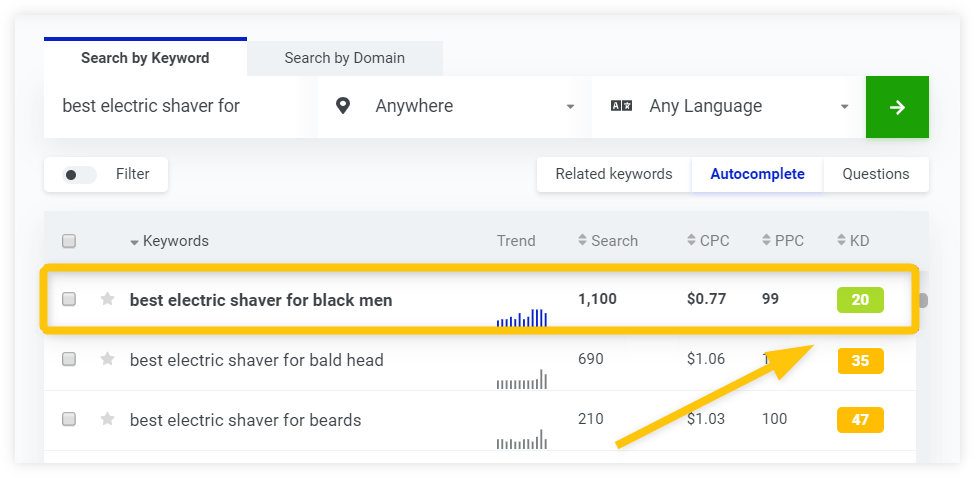
A keyword like “best electric shaver for black men” with a KD score of 20 is a great find. Low competition like this is always worth exploring. Upon checking the allintitle results, only 50 pages were competing. That sounds promising, right?
Here’s how the KGR calculation works:
KGR = allintitle results / search volume
For this keyword:
KGR = 50 / 1100 = 0.045
While this KGR score looks excellent, it doesn’t meet the search volume requirement of being under 250. A key principle of KGR is low search volume, which helps keywords rank faster. Higher search volume can make ranking more competitive and slower.
This keyword is still worth considering, but it’s not KGR compliant. Exceptions do exist, and there are strategies to succeed with higher-volume terms. This is something to keep in mind when selecting keywords for quick results.
Use Spreadsheet to Check “Allintitle” Quickly
Clicking back and forth between tools like KWFinder and Google wastes time. A faster way is using a spreadsheet designed to simplify the process.
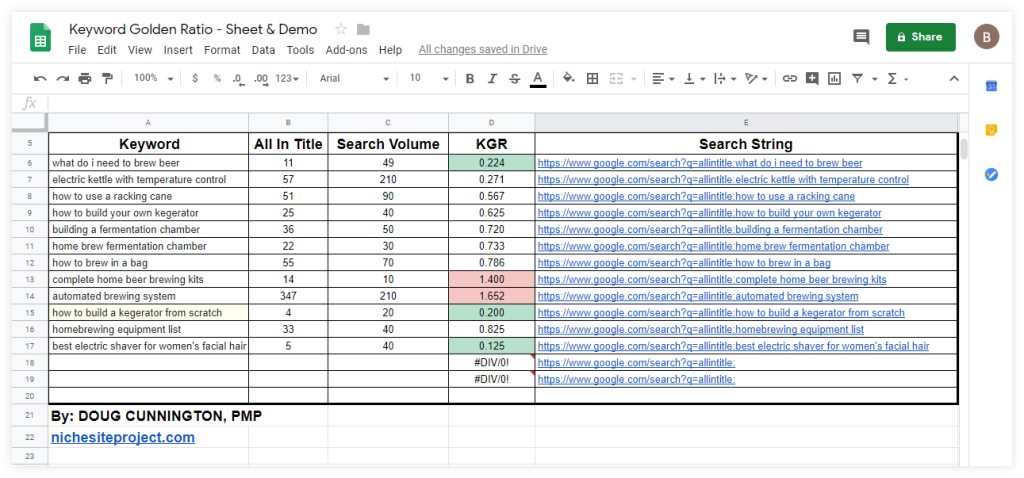
Start by adding your chosen keywords and search volumes from KWFinder into the spreadsheet. Each keyword will create a hyperlink using the “allintitle” command for easy checking.
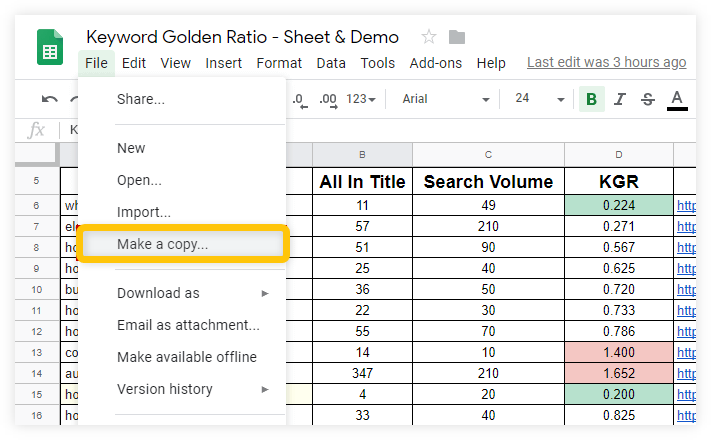
After you check the “allintitle” results, the spreadsheet will find the Keyword Golden Ratio (KGR) in a short amount of time. It even color-codes the results—green, yellow, or red—based on the KGR value.
Final Tips for KGR Success
- Focus on keywords with search volumes below 250.
- Prefer long-tail keywords with low competition.
- Use “allintitle” to analyze competitors.
- Tools like KWFinder save time and simplify research.
These steps help find low-competition keywords that drive traffic faster. Concentrate on specific, actionable terms to enhance rankings.
Keyword Difficulty vs. the Keyword Golden Ratio – which is better?
Keyword research is key to improving website rankings. Two popular methods are Keyword Difficulty (KD) and the Keyword Golden Ratio (KGR). Both tools offer value but work differently. Using both together can improve your SEO results.
What is keyword difficulty?
Keyword Difficulty measures how hard it is to rank for a keyword. Tools like KWFinder calculate KD by analyzing factors such as:
- Domain Authority (DA) and Page Authority (PA).
- Citation Flow and Trust Flow.
- Backlinks to competing pages.
A lower KD score means less competition. It’s great for sites starting out or those with fewer backlinks.
What is the Keyword Golden Ratio?
The Keyword Golden Ratio helps find low-competition keywords. It checks if these keywords are in the titles of ranking pages. If very few pages include the keyword in their titles, the competition is likely lower. This makes it a helpful tool for finding keywords that are easier to rank for.
Why Use Both KD and KGR?
Both methods provide unique insights. KD looks at how strong competitors’ pages are. KGR checks whether a keyword is the direct target. They work together to find keywords that are easier to rank for. These keywords are also more likely to bring in traffic.
Combining KD and KGR for better SEO
For the best results, look for keywords with a low KD score that also match KGR criteria. These keywords are often easier to rank for and have less competition. Avoid keywords with high KD and poor KGR scores, as they may be too competitive.
Why KWFinder Is a Useful Tool
KWFinder is a trusted tool for analyzing keyword difficulty. It provides clear data, including:
- Domain and Page Authority.
- Citation Flow and Trust Flow.
- Backlinks for ranking pages.
- Social shares, such as Facebook activities.
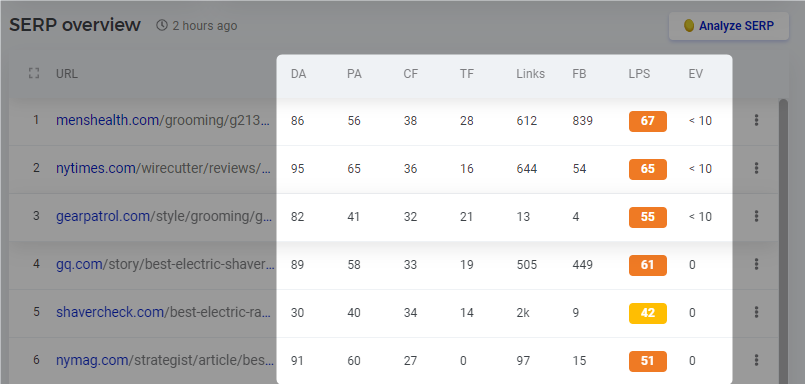
These insights help to test keyword competition and ranking potential.
Improving Your SEO Strategy
Using KD and KGR together can make keyword research more effective. Target low-competition keywords that offer higher chances of ranking. This approach helps attract more traffic without competing for highly competitive terms.
Combining Keyword Difficulty with the Keyword Golden Ratio makes it easy to find the best keywords. This method can help improve visibility and grow website rankings over time.
Pitfalls with Keyword Golden Ratio (KGR)
The Keyword Golden Ratio (KGR) is a great way to rank your content fast. It’s simple and effective when done right. But there are some challenges you need to know about before diving in. Let’s explore the common issues and how to avoid them.
Avoid keyword stuffing
Using your focus keyword too often can hurt your content. KGR terms are usually long, often 4 or more words. Repeating long phrases several times will make your writing sound strange and unnatural. Using the phrase “best ballpoint pen for journaling” more than twice in an article can sound forced.
A good rule is to include your KGR keyword once in the title and once in the main content. Use related keywords or partial matches to keep your writing natural. Yoast SEO may suggest you repeat the keyword a lot, but trust your gut. Write for readers, not for algorithms.
Keywords that may not rank
Even if a keyword looks perfect, it may not perform as expected. Search engines like Google rank user intent. Before writing, search for your keyword and see who’s ranking. If you find e-commerce sites, users prefer shopping results. If videos dominate, users might want visual content.
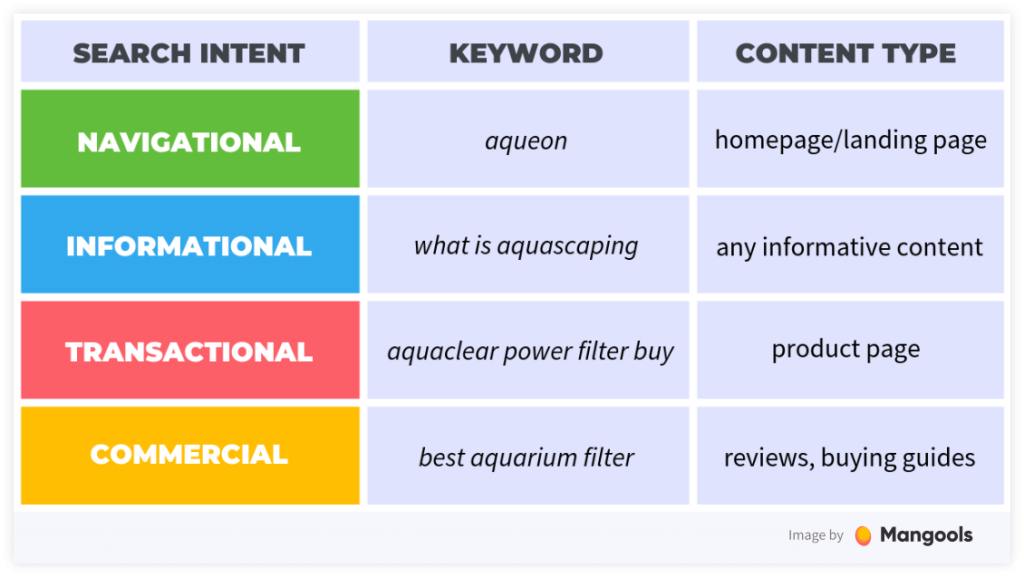
For health or medical terms, you’ll often see sites like WebMD or Mayo Clinic ranking. These high-authority sites make it hard for smaller websites to compete. If you don’t see content like yours in the search results, the keyword may not be right for your site.
Difficulty finding KGR-compliant terms
Finding good KGR terms takes practice. It’s not something you can automate. You need to conduct keyword research by hand. This ensures you find low-competition terms that fit your niche.
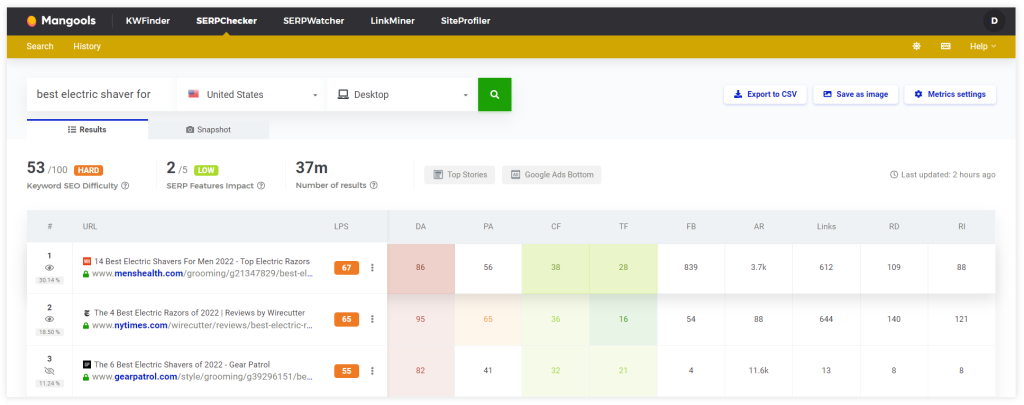
To speed up the process, use tools like SERPChecker or KWFinder. These tools can analyze search results for metrics like:
- Domain and Page Authority
- Title tags of top-ranking pages
- Link strength of competitors
- Keyword difficulty
- SERP features affecting engagement
These insights can help you decide if a keyword is worth targeting.
Trying only one KGR-compliant post
The KGR method works best at scale. Relying on one post isn’t enough to see results. Try targeting at least 20 KGR keywords. Out of these, a small percentage will rank better than expected, some worse, and most will rank in the top 30-50.
Over time, rankings improve with quality content, site authority, and reduced competition. Publishing only one post may make you think the method doesn’t work. But consistent effort with many posts can show real results.
Conclusion
The Keyword Golden Ratio (KGR) is a simple and effective SEO strategy. It helps find long-tail keywords with low competition. This method improves search engine rankings and drives traffic to your site.
KGR focuses on keywords that others often ignore. It’s perfect for new websites or blogs trying to rank earlier. Even during the Google sandbox period, this strategy can bring traffic.
Finding KGR terms takes some work, but the results make it valuable. It’s free and ideal for beginners who want to grow organic traffic faster. Target keywords with lower search volumes that match your content well. This gives an edge over competitors who miss these opportunities.
KGR works for bloggers, niche websites, and anyone aiming for steady traffic. You need no advanced skills, research, and practice. With the right keywords, content starts ranking faster, leading to more visibility.
Start using the Keyword Golden Ratio now. It opens up opportunities for faster rankings and increased traffic.
FAQs: Keyword Golden Ratio (KGR)
What is KGR?
The Keyword Golden Ratio (KGR) is a formula. It finds low-competition keywords. It does this by comparing “allintitle” results to monthly search volume. A KGR under 0.25 is ideal for easier rankings, especially for new websites.
Can tools automate KGR?
No, fully automating KGR is difficult due to CAPTCHA and setup challenges.
What if tools show different search volumes?
Stick to one tool. Focus on keyword comparisons, not exact numbers.
What if KGR is under 0.25, but volume exceeds 250?
It’s still helpful, but may take longer to rank due to higher competition.
Are there exceptions to KGR?
Yes, experienced sites can target higher search volumes or use KGR values of up to 1.5.
Comments